Coming Soon
FinanceOS
Smart Accounting & Finance Management System
Learn More
Human-sounding Hindi & English narration, made on your own computer
AXPERTZ VOICE STUDIO turns a pasted script into narrated audio. It breaks the text into lines, hears the mood in the writing — a warning reads differently from a startle — and speaks each line in the voice you choose. Name the characters in your story once, give each a voice, and tag their lines; the chowkidar sounds like the chowkidar every time. It writes a .wav, matching .srt subtitles timed to the actual audio, and a small .m4a for sharing. The neural voices — four Hindi, nine English — are downloaded once and then everything, including the voices themselves, runs on your own computer. Nothing you write or record ever leaves it.
Key benefits
The neural voices carry tone, not just words — a whispered line is whispered, a warning lands heavier than small talk. Hindi narration that does not sound like a railway announcement.
Register once with your email address and a password — after that, everything runs offline. Your scripts and recordings are never uploaded; the account carries your identity, not your work.
The script is held line by line, and only a changed line is spoken again. Hearing one wrong word in a long story costs seconds to fix, not another full render.
Core features
The capabilities AXPERTZ VOICE STUDIO ships with.
Paste the whole script; it is broken into sentences automatically. Hinglish typed in Roman letters becomes proper Devanagari before it is spoken.
Name the people in your story once, give each a voice, and tag their lines. No more setting a voice line by line.
Mix two neural voices into a third — so a story with three men is not stuck with two male voices.
The app hears "काँपती आवाज़" and reads the line accordingly. Every guess is shown, explained, and yours to overrule.
The .srt is built from the measured duration of each spoken line, so captions and audio stay in step for the whole story.
An optional layer of room tone, wind, drone or heartbeat under the narration, with a volume control. Off by default.
A pronunciation dictionary for the words the voices get wrong — a brand, a name — written once, said right everywhere.
Every render writes a studio .wav, matching .srt subtitles, and a small .m4a that is actually sendable on WhatsApp.
How it works
Hindi, English or both. It is split into lines, each with its own play button.
Pick a narrator, create your characters, tag their lines. Preview any line before committing to a render.
One click writes the .wav, the .srt and the .m4a. Change a line later and only that line is re-spoken.
Interface preview
Generated previews of the main screens, shown to illustrate layout and structure. These are not actual product screenshots — real captures will replace them.
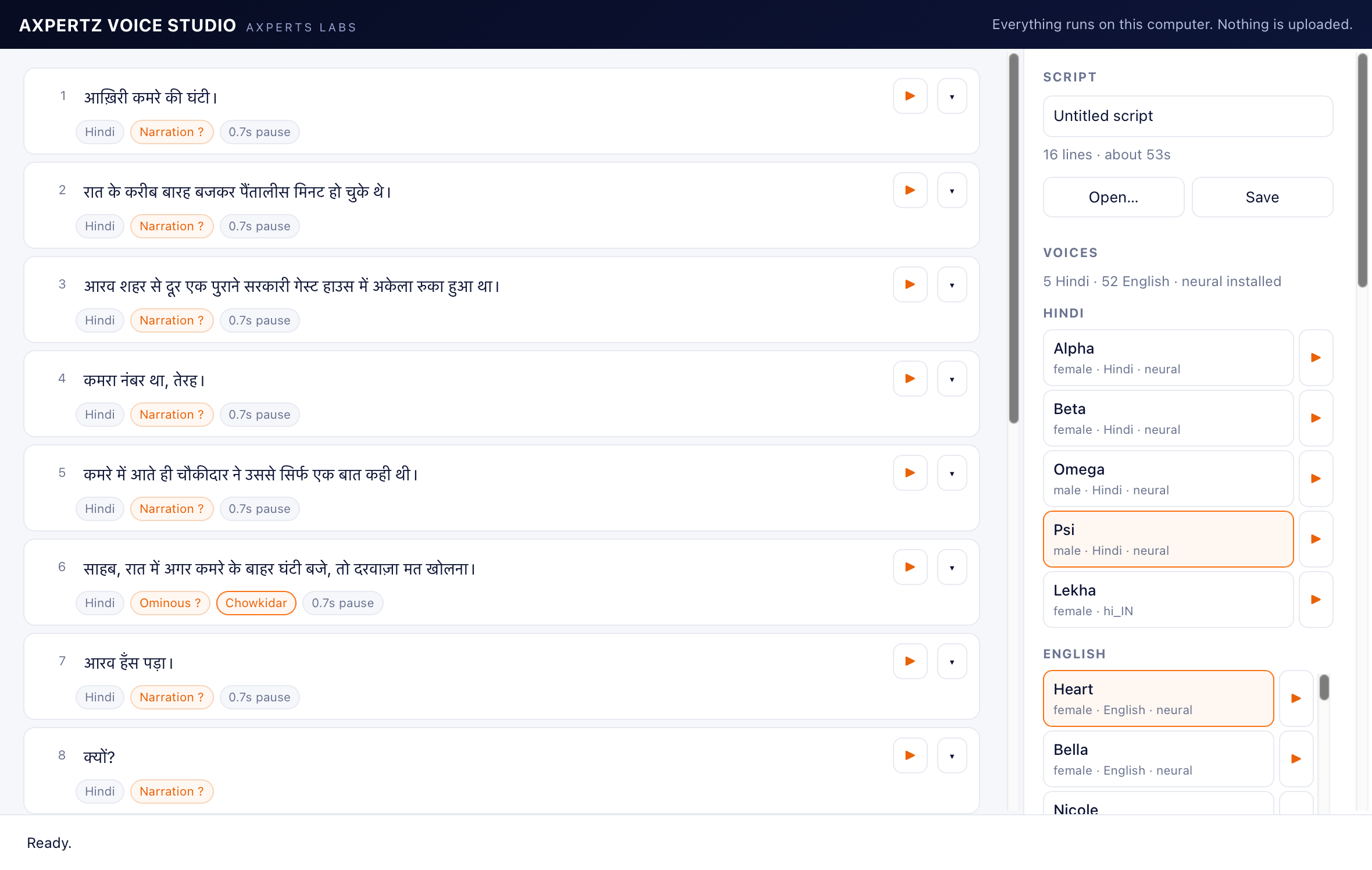
The script, cast and voices
A Hindi horror story mid-production: moods guessed per line, the chowkidar tagged with his own voice.
Actual application screenshot
Characters
Each person in the story gets a voice once — and two voices can be blended into a third.
Interface preview — not an actual screenshot
Download
A separate build for each operating system. Download, install, then register inside the application.
SHA-256
b0f115bfba869a184c182874ec8de0435725bd496fefd53f7547c43177d2cf43
SHA-256
d33c615bf360506dfc4c4ed71d33dbd42257e7427b614b190056b929b7d634be
Check this before you download. Not every part of this software is equally demanding, so each part is listed separately with what it actually needs.
What almost everyone uses. Any computer bought in the last several years runs it.
| Windows | Windows 10 or later, 64-bit |
|---|---|
| macOS | macOS 12 or later, Apple Silicon (M1 and newer) |
| Memory (RAM) | 4 GB minimum, 8 GB comfortable |
| Disk space | 1 GB — the application is 12 MB and the neural voices are a 310 MB one-time download |
The application itself uses about 40 MB of memory while running. Intel Macs are not supported: the neural voice engine ships only for Apple Silicon.
Turning the finished narration into a 1080p .mp4 with matching subtitles.
| Windows | Windows 10 or later, 64-bit |
|---|---|
| macOS | macOS 12 or later, Apple Silicon |
| Memory (RAM) | 8 GB |
| Disk space | 2 GB free while a video is being made |
A one-minute video takes about a minute to make; encoding is the only heavy part.
Drawing every scene of the story in 3D, 2D or photographic art. Optional — without it, videos are made with the designed text screens instead.
| Windows | — not available on Windows |
|---|---|
| macOS | macOS 12 or later, Apple Silicon — M1 Pro or newer recommended |
| Memory (RAM) | 16 GB minimum, 32 GB strongly recommended |
| Disk space | 8 GB for the visuals pack, plus room for the pictures |
This is by far the heaviest thing the application does: the picture model needs about 25 GB of memory while drawing. On a 16 GB Mac it works but has to page to disk, which makes each picture take roughly six to ten minutes; on 32 GB the same picture takes one to two. Scene pictures are not yet available on Windows — the drawing engine we use runs only on Apple Silicon, and a Windows engine is separate work we have not done. Everything else on this page works on Windows.
Windows shows a warning before the first launch of software it has not seen before. It is about how many people have installed the file so far, not about what is in it — and it is the same warning every new application gets, from every publisher, on its first day.
You do not have to take our word for it. Every download on this page carries its SHA-256 — a fingerprint of the exact file we published. Run the one command below and compare: if it matches, what reached your computer is byte-for-byte what left ours, and nothing altered it on the way.
Windows judges an installer partly by how many people have run it. A newly published version starts at nothing and earns that quietly, so the panel can appear again after an update even though nothing about the software changed.
To check the file first, in PowerShell:
Get-FileHash .\AXPERTZ-VOICE-STUDIO-1.1.2-Windows-setup.exe -Algorithm SHA256
There is no licence key to buy on this website. You register inside the application after installing it, and your licence is issued and activated there.
Get the build for your operating system — Windows or macOS.
Run the installer on the computer where you keep your books.
Open the application and complete registration. Your licence is issued during this step.
Activate inside the application. Everything happens in the app — there is nothing to activate on this website.
Pricing
Free for your first month, then ₹99/month (Pro ₹199) · pricing for this product is quoted on request.
Narration in Hindi and English with your own cast of voices, subtitles, and a finished video — everything except the drawn scenes.
₹99/month
Download & RegisterEverything in Basic, plus every scene of the story drawn — in 3D animation, 2D illustration or photographic art, with your characters looking the same throughout.
₹199/month
Download & RegisterFAQ
Windows 10 or later (64-bit), and Apple Silicon Macs (M1 and newer) running macOS 12 or later. Intel Macs are not supported: the neural voice engine ships only for Apple Silicon.
No. You register once with your email address and a password — the same AXPERTZ account that works in AXPERTZ GST PRO and AXPERTZ OFFICE TOOLS — and that carries your identity only. The neural voices are downloaded once (about 310 MB) and after that everything, including the voices, runs on your own computer, offline.
No — one account, every product. Register once in any AXPERTZ application and the same sign-in works in all of them. Forgotten your password? Ask for a reset from the sign-in screen and the link arrives by email — we never see or store the password itself.
There are two kinds. The neural voices (four Hindi, nine English) sound like people reading a story, with mood and pacing. Your Mac’s built-in system voices are also available — they are instant but machine-like. You can mix both in one script.
No. The macOS build is signed with our Apple Developer ID and notarised by Apple — both the application and the disk image — so it opens straight away with no warning. The Windows installer is not yet code-signed, so SmartScreen still asks there; choose More info, then Run anyway. Either way you can check the SHA-256 on this page against your download.
There are two plans and the first month is free on both, from the day you register. After that, Basic is Rs. 99 per month and covers narration, subtitles and video; Pro is Rs. 199 per month and adds the drawn scene pictures, which are by far the most expensive thing the software does to produce. You choose your plan when you first sign in, and can change it later.
Basic, unless you want every scene of your story illustrated. Basic gives you the voices, the characters, the subtitles and a finished 1080p video with designed text screens. Pro adds AI-drawn scenes in 3D, 2D or photographic art — and needs an Apple Silicon Mac with 16 GB of memory or more to draw them, so check the requirements below before choosing it.
Products that work alongside this one.
Smart Accounting & Finance Management System
Accounting, GST Billing & Business Management Software
Tally-style Accounting, Inventory & Payroll — Offline
Everything is described above — download it, or talk to us if anything is unclear.