Coming Soon
FinanceOS
Smart Accounting & Finance Management System
Learn More
Accounting, GST Billing & Business Management Software
AXPERTZ GST PRO brings accounting, GST billing and day-to-day business management together. It is local-first: your books stay in a database on your own computer, not on our servers. It produces GST-compliant invoices, keeps stock in step with billing, and maintains the transaction detail your returns are prepared from. It does not file returns on the government portal for you — it keeps the underlying records correct and ready.
Key benefits
Invoice formats and tax treatment follow GST rules instead of being patched together.
Transaction data stays organised through the year, not rebuilt in the last week.
Consistent GSTIN, HSN and tax details reduce corrections and credit notes.
Core features
The capabilities AXPERTZ GST PRO ships with.
Tax invoices, bills of supply, credit and debit notes with correct tax breakup.
Store IRN and e-way bill details against the transaction they belong to. Record-keeping only — generation on the government portal is not included.
Maintain item-wise HSN codes and tax rates so billing stays consistent.
Customer and supplier records with GSTIN, place of supply and contact details.
Outward and inward summaries organised for handover to your filing process.
Track billed items and stock movement alongside your invoices.
AXPERTZ GST PRO automatically creates recovery backups on your computer so you can restore your accounting data if the active database is accidentally deleted or becomes corrupted.
How it works
Add your GSTIN, place of supply, invoice series and tax preferences.
Raise GST invoices with the right tax treatment applied automatically.
e-Invoice, e-way bill and payment details stay linked to each transaction.
Produce period summaries for your accountant or filing workflow.
Interface preview
Generated previews of the main screens, shown to illustrate layout and structure. These are not actual product screenshots — real captures will replace them.
Billing dashboard
Sales, tax collected and pending documents by period.
Interface preview — not an actual screenshot
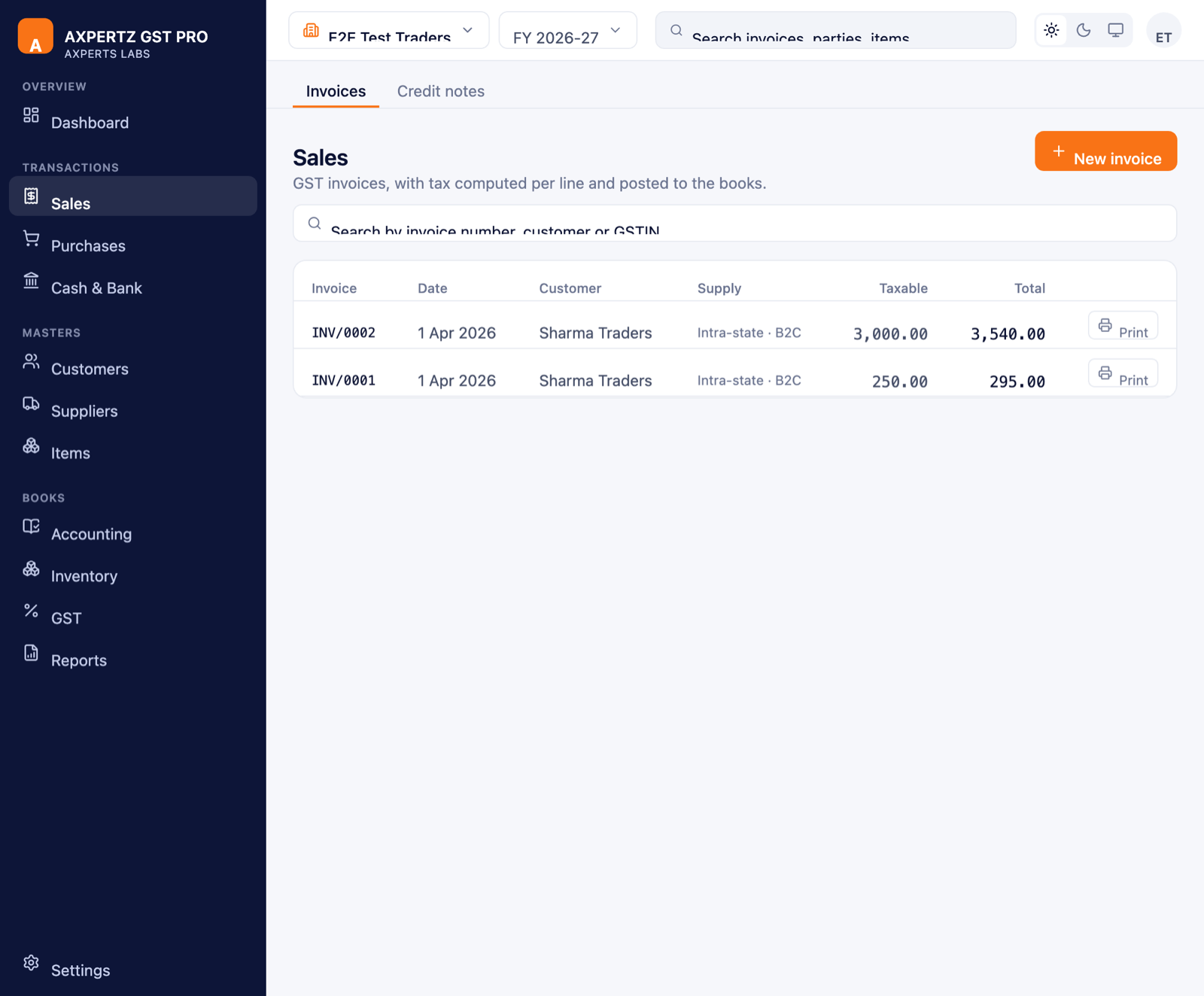
Invoice register
Every invoice with supply type, taxable value and totals.
Actual application screenshot
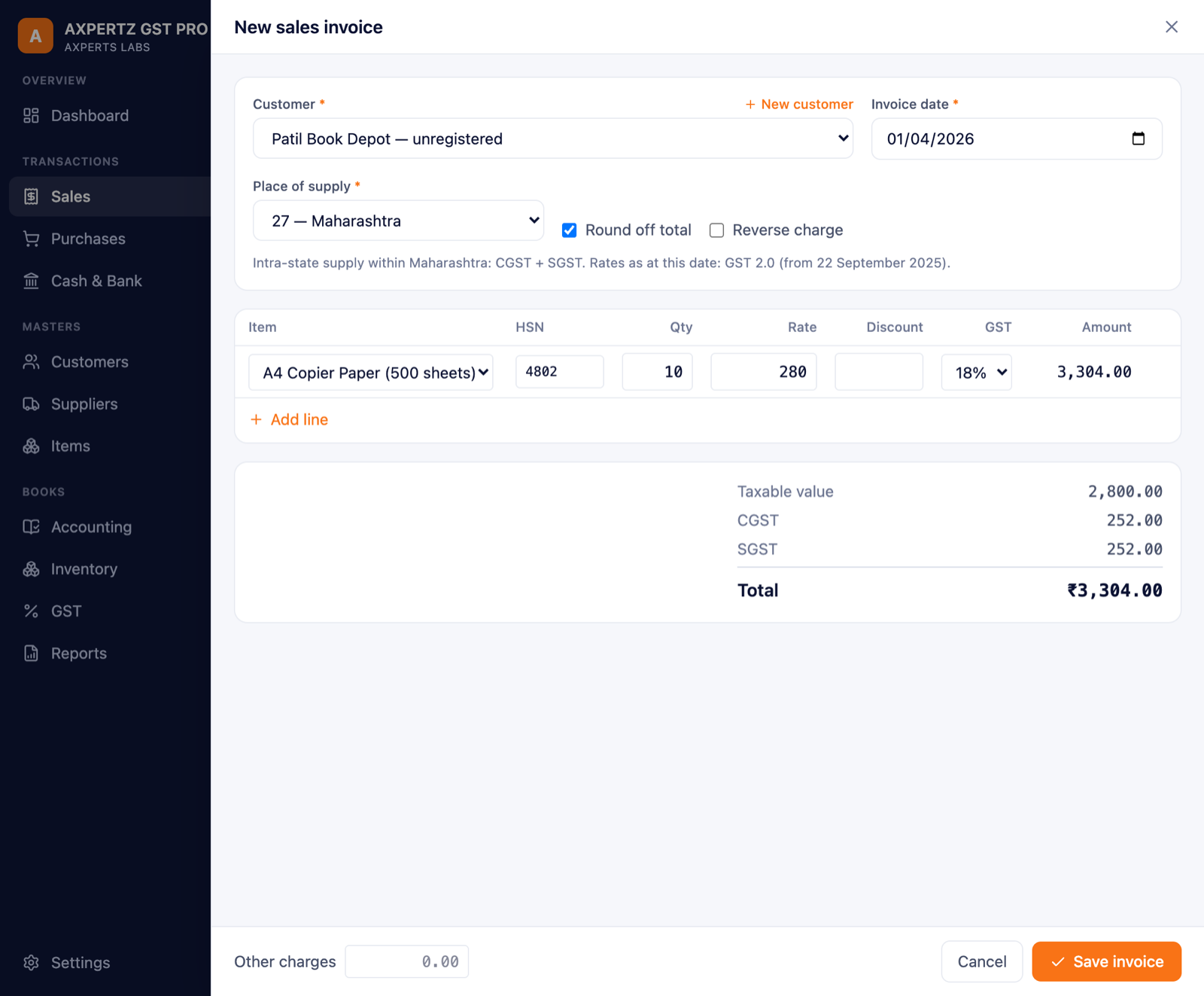
New GST invoice
Item-wise entry with live CGST/SGST computation — and a missing customer or item can be added right here.
Actual application screenshot
Download
A separate build for each operating system. Download, install, then register inside the application.
SHA-256
6d58d79fb9cfef121a8fa6200f47facdab8616efbf4b7fbd0b1cbae038376e30
SHA-256
9d6a371418ba951c9df5fd0c9c5adfe0343a4f006cd92d0f77212e9c22ed3f93
Check this before you download. Not every part of this software is equally demanding, so each part is listed separately with what it actually needs.
Billing, accounting, stock and returns data — all of it on one ordinary computer.
| Windows | Windows 10 or later, 64-bit |
|---|---|
| macOS | macOS 10.15 or later — Apple Silicon and Intel |
| Memory (RAM) | 4 GB minimum, 8 GB comfortable |
| Disk space | 2 GB, plus room for your own books as they grow |
Your books live in a database on this computer, so keep free space for them and for the automatic local backups. No internet connection is needed for day-to-day work.
Windows shows a warning before the first launch of software it has not seen before. It is about how many people have installed the file so far, not about what is in it — and it is the same warning every new application gets, from every publisher, on its first day.
You do not have to take our word for it. Every download on this page carries its SHA-256 — a fingerprint of the exact file we published. Run the one command below and compare: if it matches, what reached your computer is byte-for-byte what left ours, and nothing altered it on the way.
Windows judges an installer partly by how many people have run it. A newly published version starts at nothing and earns that quietly, so the panel can appear again after an update even though nothing about the software changed.
To check the file first, in PowerShell:
Get-FileHash .\AXPERTZ-GST-PRO-1.0.1-Windows-setup.exe -Algorithm SHA256
There is no licence key to buy on this website. You register inside the application after installing it, and your licence is issued and activated there.
Get the build for your operating system — Windows or macOS.
Run the installer on the computer where you keep your books.
Open the application and complete registration. Your licence is issued during this step.
Activate inside the application. Everything happens in the app — there is nothing to activate on this website.
Pricing
Subscription · from ₹99/month. Taxes and GST treatment are subject to applicable law and final billing configuration.
For organisations with multiple users, custom workflows and dedicated requirements.
Custom pricing
Contact SalesFAQ
You download the build for your operating system, install it, and register inside the application. Your licence is issued during registration and activated there. There is no licence key to buy on this website.
There is a separate build for Windows and one for macOS. Those are the only two at present. A mobile application for Android and iOS is planned and will be listed here through the Google Play Store and the App Store once it exists.
AXPERTZ GST PRO organises and summarises the transaction data your returns are built from. Confirm the current filing integration scope with our team.
Invoice templates carry your branding and required statutory fields. Share your current format and we will confirm what can be matched.
Multiple registrations can be maintained separately. Tell us your structure and we will map it during onboarding.
Products that work alongside this one.
Smart Accounting & Finance Management System
Tally-style Accounting, Inventory & Payroll — Offline
Offline PDF & Document Toolkit for Your Office
Everything is described above — download it, or talk to us if anything is unclear.