Coming Soon
FinanceOS
Smart Accounting & Finance Management System
Learn More
ROC Compliance, Drafting & Practice Management for Company Secretaries
AXPERTZ CS PRO is practice software for Company Secretaries. Enter a client company once and it drives everything: the annual ROC compliance calendar with live late-fee amounts, event-based filing chains (a director appointment creates its DIR-12 clock and register entry by itself), a drafting studio that produces the notice, attendance sheet, minutes and resolutions of a meeting as one consistent set, and statutory registers that print in their prescribed forms. It is local-first: the practice database lives on your own computer — on a multi-PC licence, on the office main PC, with staff computers working from it over your own office network. Nothing is uploaded to us or anyone else. It prepares data and documents; filing on the MCA portal remains in your hands.
Key benefits
Every client company’s AOC-4, MGT-7, KYC and event filings on one dashboard — overdue, due soon, upcoming — with the late fee as of today.
One wizard generates the notice, attendance sheet, minutes and resolutions of a meeting from the same data — documents match because they share a source.
On a multi-PC licence your staff computers join the office main PC over your own network and work on the same data, each person signing in as themselves.
Core features
The capabilities AXPERTZ CS PRO ships with.
Annual obligations for companies and LLPs — AOC-4, MGT-7/7A, ADT-1, DIR-3 KYC, DPT-3, MSME-1, PAS-6, LLP Forms 8 & 11 — generated per client per year, with statutory due-date logic and late-fee amounts.
Record what happened — appointment, allotment, charge, SBO declaration, incorporation — and the form deadlines and register entries it causes are created together.
Board, AGM, EGM and committee meetings; 40+ statutory templates including directors’ report, MR-3 and MGT-8 drafts, SH-4 and share certificates — exported as Word documents.
Members, transfers, directors & KMP, charges, MBP-2/4 and SBO (BEN-3) registers — filled by events, editable by hand, printed in the prescribed form.
Onboard an existing practice from your client folders, an Excel sheet, or pasted MCA master data — with confirmation before anything is saved.
Each person works under their own username and PIN; admins control settings and access, staff do the work.
The office main PC holds the data; other PCs of the licence pair with a one-time code and work on it over your office Wi-Fi or LAN. No cloud involved.
How it works
Point the app at your client folders or fill the Excel template — companies, directors and documents come in together.
Every applicable obligation lands on the dashboard with its statutory due date.
Filings and registers follow from the event; meeting documents come out as one set.
File on the MCA portal as always, record the SRN, and the task retires into your proof-of-work record.
Interface preview
Generated previews of the main screens, shown to illustrate layout and structure. These are not actual product screenshots — real captures will replace them.
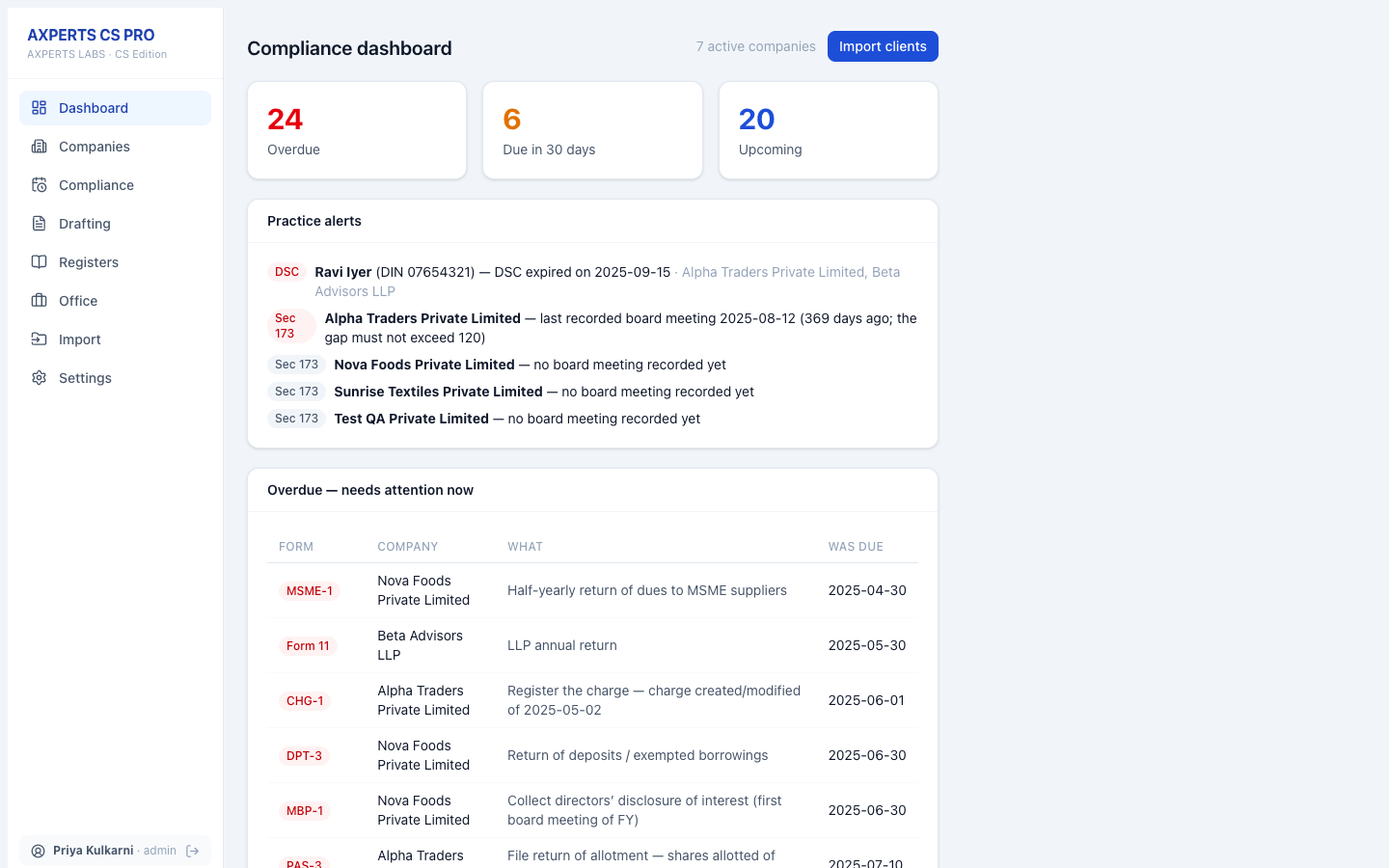
Compliance dashboard
Overdue, due-soon and upcoming filings across every client, with DSC-expiry and Section 173 practice alerts.
Actual application screenshot
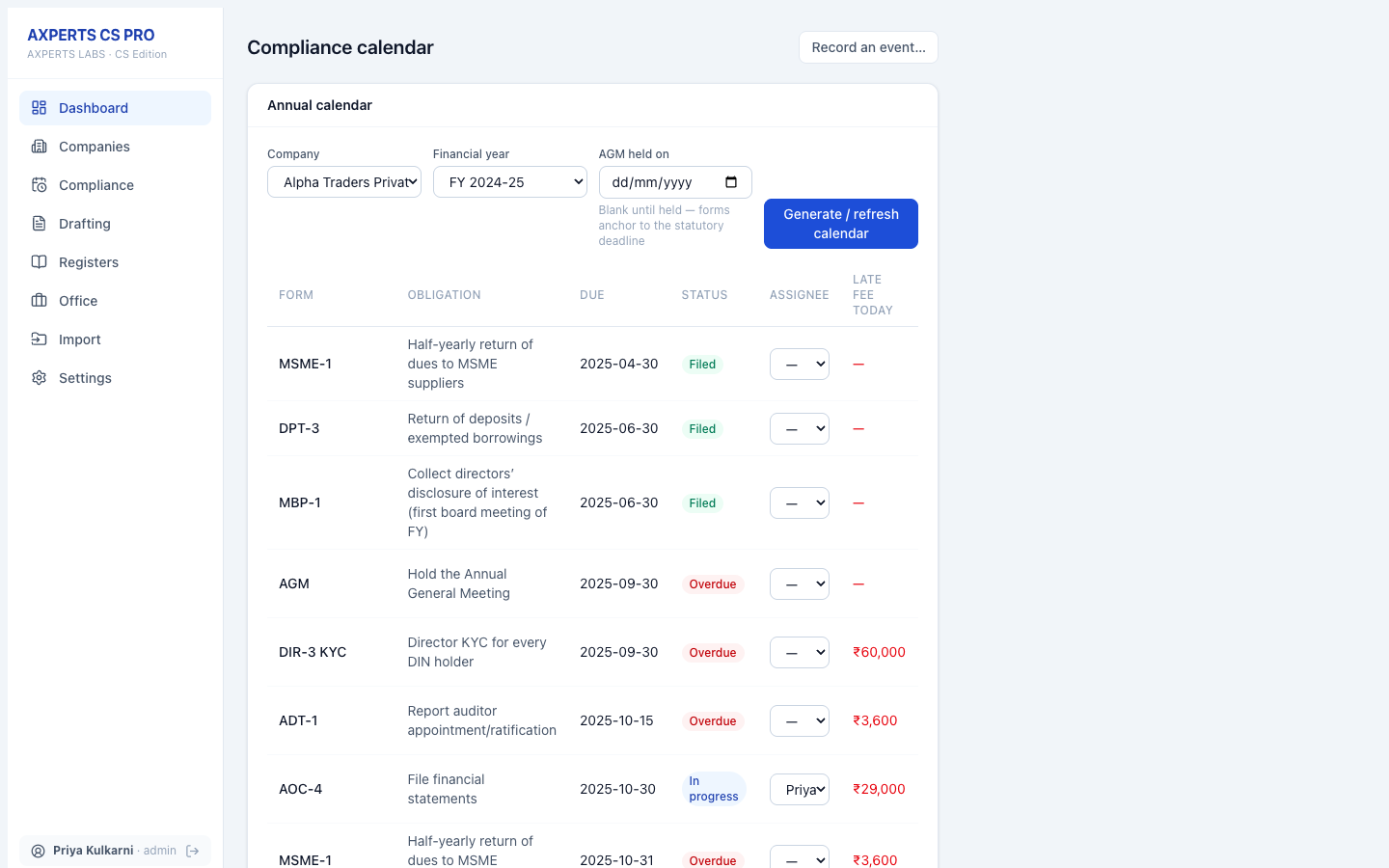
Compliance calendar
One company’s year — filed, in-progress and overdue, with the late fee as of today against each form.
Actual application screenshot
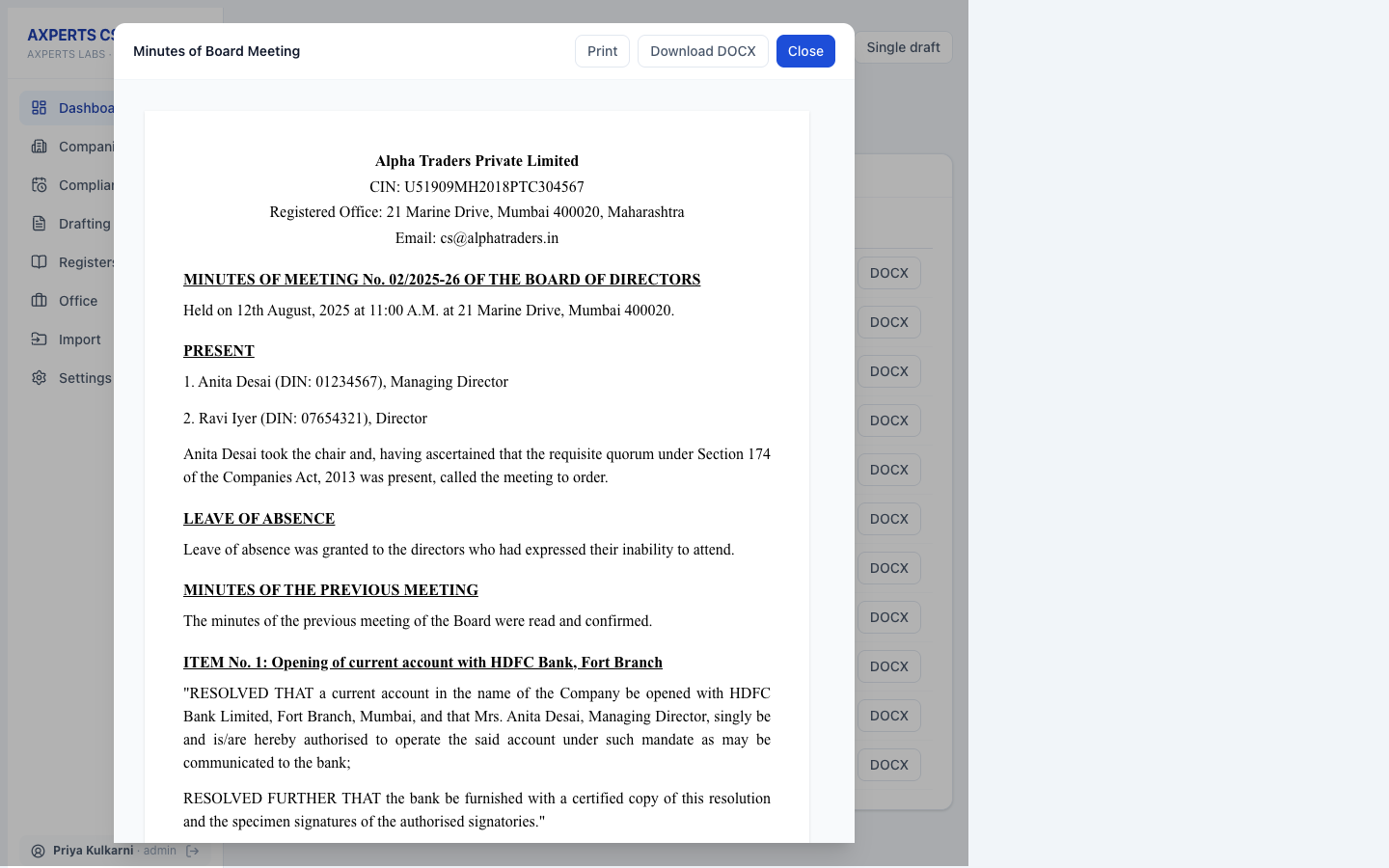
Board minutes, generated
Minutes produced by the meeting wizard — company head, quorum, items and resolutions — ready to print or export to Word.
Actual application screenshot
Download
A separate build for each operating system. Download, install, then register inside the application.
Ask to be told when the Windows build is released.
SHA-256
751c5f68531bad85817e466be8d76e82809a82e9e34d037d2369d6a2949e8a21
There is no licence key to buy on this website. You register inside the application after installing it, and your licence is issued and activated there.
Get the build for your operating system — Windows or macOS.
Run the installer on the computer where you keep your books.
Open the application and complete registration. Your licence is issued during this step.
Activate inside the application. Everything happens in the app — there is nothing to activate on this website.
Pricing
Subscription · from ₹99/month. Taxes and GST treatment are subject to applicable law and final billing configuration.
FAQ
Yes. Every plan — single PC or multi-PC — is free for one month from registration, with no card asked for. After that, Single is Rs. 99 per month and Multi is Rs. 199 per month, charged automatically, and you can cancel at any time from inside the application.
Single covers one computer. Multi covers the number of PCs you choose (2 to 10): the office main PC holds the data, and the other PCs join it with a one-time pairing code over your own office network — everyone works on the same records, each under their own sign-in.
No. The practice database is a file on your own computer. Even on a multi-PC office, data moves only between your own machines on your own network. Nothing is uploaded to AXPERTZ.
No, and deliberately so. It prepares the data, the deadlines and the documents; filing on the portal stays in your hands, as it should.
Yes — three ways: point it at your client folder tree, fill the Excel template it gives you, or paste a company’s MCA master data. It shows you what it found and saves only after you confirm.
Products that work alongside this one.
Smart Accounting & Finance Management System
Accounting, GST Billing & Business Management Software
Tally-style Accounting, Inventory & Payroll — Offline
Everything is described above — download it, or talk to us if anything is unclear.